The Ultimate DIY Recipe Book Template for Amazon KDP
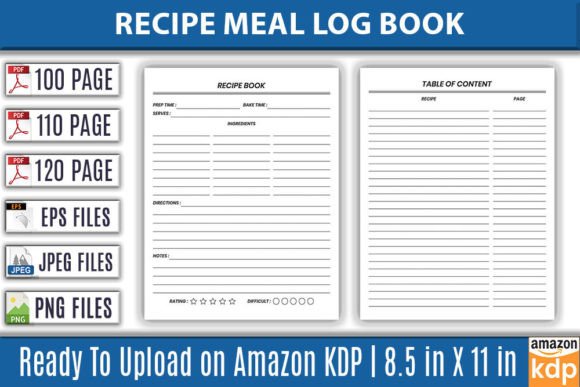
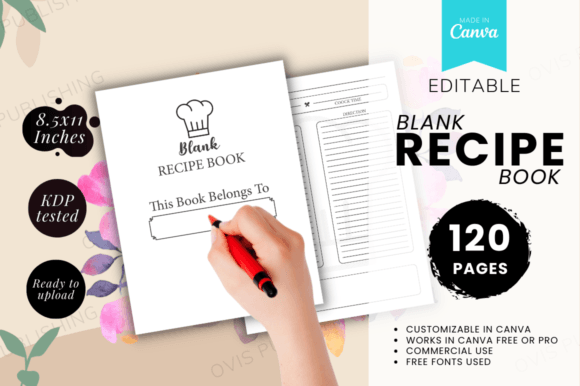
Creating a physical product for your low-content book business can feel daunting, especially if design isn't your core skill. The Blank Recipe Book - Canva Template solves this exact problem. It’s a fully structured, 120-page interior template designed for one purpose: to get a professional, sellable recipe book into your Amazon KDP catalog as efficiently as possible. This isn't just a collection of blank pages; it's a pre-formatted framework with numbered pages, a dedicated "This Book Belongs To" page, and a clean, classic layout that appeals to a wide audience of home cooks.
Think of it as the foundation of your project. The visual characteristics are deliberately simple and functional. The style leans towards a timeless, straightforward appeal with clear sections for recipe names, ingredients, and instructions. This minimalist approach is its greatest strength. It avoids overwhelming decorative elements, ensuring the end-user—the person writing in their cherished recipes—has a clean canvas. The overall personality is neutral and welcoming, making it suitable for family cookbooks, themed recipe collections, or personalized gifts.
Why a Structured Template Beats a Blank Slate
For entrepreneurs and publishers, time is the most valuable commodity. Starting with a truly blank document means inventing every margin, page number position, and structural flow. The Blank Recipe Book template eliminates that foundational work. The 119 numbered recipe pages (with page 120 reserved for ownership) provide immediate consistency. This is crucial for print, as a haphazard layout can feel amateurish. The template’s ready-to-print 8.5 x 11 inch size is the standard for many successful KDP interiors, offering a generous area for handwritten or typed entries.
Where does this template work best? Its primary and most powerful application is, of course, for the Amazon KDP low-content book niche. It’s perfect for creators who understand the market demand but lack the design time or software expertise. Beyond KDP, it serves crafters and hobbyists making personalized gifts, bloggers wanting to offer a physical companion to their online content, or small businesses creating branded cookbooks for clients or events. The included Canva link means modification is accessible to almost anyone; the Adobe InDesign source file caters to professional designers seeking deeper customization. This dual-format offering significantly broadens its utility.
The Practical Value of Editability and Readiness
The keywords "EDITABLE – PRINTABLE – CANVA TEMPLATE" describe a specific workflow benefit. You aren't buying a static PDF you cannot alter. You are acquiring a flexible asset. In Canva, you can change colors, perhaps add subtle background textures, or modify the header font for a different vibe before uploading the final PDF to KDP. This level of control allows you to create variations—a rustic recipe book, a modern minimalist cookbook, a vintage-style journal—all from the same core template, helping you scale your product listings without starting from zero each time.
From a commercial perspective, the template’s readiness directly influences professionalism and audience engagement. A well-structured book feels trustworthy. When a customer purchases a recipe journal, they anticipate a logical, easy-to-use format. This template delivers that expectation, enhancing the perceived value of your KDP listing. Consistency across the 120 pages builds a professional rhythm, aiding the user experience. For your business, it means you can review the provided PDF, ensure it meets KDP’s technical specifications, and upload it with confidence, speeding up your publishing cycle.
Navigating the Design Choices for Your Market
While the template is expertly formatted, your success will hinge on how you present it. The interior is a tool; the cover is your primary marketing asset. The template is suitable for your low-content book business, but it is ready for you to add your own cover. This is where your creativity and market research must shine. A compelling cover design, paired with this clean interior, creates a complete product that stands out. Consider pairing the template’s classic interior with a cover that uses a warm, handwritten font for a familial feel, or a sleek sans serif font for a modern culinary aesthetic.
Testing the final product is a simple but critical step. Once you’ve made any desired tweaks in Canva, print a sample page at home. Check the readability of the text areas, the alignment of the page numbers, and how it feels to write on. This hands-on review ensures the physical object meets quality standards before you commit to a KDP upload. It also gives you firsthand insight into the customer experience, allowing you to better describe the product in your Amazon listing.
From Template to Tangible Product: A Launch Strategy
Having a ready-to-upload PDF is a significant advantage, but launching effectively requires a broader view. Use the Blank Recipe Book - Canva Template as the core of a small product line. Create a standard version, a "family edition" with a different cover, and perhaps a "baking specialist" version by slightly modifying the subtitle text within Canva. This approach leverages the one template to serve multiple niches within the recipe book market, maximizing your return on the initial asset.
Remember, the audience for these books is diverse—from someone documenting grandma’s recipes to a new cook organizing their weekly meals. Your listing description should highlight the template’s features: the numbered pages for organization, the generous space for 120 recipes, the classic layout, and the fact it’s both printable at home and optimized for KDP commercial print. Speak to the emotional value of preserving recipes in a beautiful, permanent format, while backing that promise with the practical, professional foundation this template provides.
Ultimately, this template removes the biggest technical barrier for creators in the recipe book niche. It provides the structural integrity and ready-for-print specifications that allow you to focus on what matters more: marketing, branding, and building your KDP business. It’s a pragmatic investment into a proven product category, giving you a deployable asset you can modify, adapt, and launch with, starting today.